Mac keyboard shortcuts cheat sheet
The Mac keyboard shortcuts worth knowing, on one page: everyday editing, apps and windows, tiling, screenshots, text and Finder. Press ⌘P and it prints cleanly.
The big five: ⌘C copy, ⌘V paste, ⌘Z undo, ⌘⇥ switch apps, ⌘␣ Spotlight.
Symbols: ⌘ Command, ⌥ Option, ⌃ Control, ⇧ Shift. Print it: press ⌘P.
What the symbols mean
Menus and this sheet use symbols for the modifier keys. Hold them together, then press the last key.
| Symbol | Key |
|---|---|
| ⌘ | Command · Cmd. Older Macs also had an Apple logo on it. |
| ⌥ | Option · Opt, Alt |
| ⌃ | Control · Ctrl |
| ⇧ | Shift |
| ⇪ | Caps Lock |
| 🌐︎ | Fn / Globe · Function key, fn |
| ↩ | Return · Enter |
| ⌫ | Delete · Backspace. Deletes to the left. |
| ⌦ | Forward Delete · Del. Deletes to the right. Fn-Delete on laptops. |
| ⎋ | Escape · Esc |
| ⇥ | Tab |
| ␣ | Space · Space bar |
Full list, plus a tool that turns any shortcut into symbols: Mac keyboard symbols.
Everyday shortcuts
| Keys | What it does |
|---|---|
| ⌘C | Copy |
| ⌘X | Cut |
| ⌘V | Paste |
| ⌘Z | Undo |
| ⇧⌘Z | Redo |
| ⌘A | Select all |
| ⌘F | Find |
| ⌘S | Save |
| ⌘P | |
| ⌘O | Open a file |
| ⌘T | New tab |
| ⌘W | Close the window |
| ⌥⌘W | Close all of the app’s windows |
| ⌘Q | Quit the app |
| ⌘, | The app’s settings |
Apps and windows
| Keys | What it does |
|---|---|
| ⌘⇥ | Switch apps |
| ⌘` | Next window of the same app |
| ⇧⌘` | Previous window of the same app |
| ⌘H | Hide the app |
| ⌥⌘H | Hide all other apps |
| ⌘M | Minimize the window |
| ⌥⌘M | Minimize all of the app’s windows |
| ⌃⌘F | Full screen on or off |
| ⌃↑ | Mission Control |
| ⌃↓ | All windows of the app |
| FnH | Show the desktop |
| ⌥⌘⎋ | Force Quit |
More in how to switch windows and full screen vs. Fill.
Window tiling (macOS 15 and later)
| Keys | What it does |
|---|---|
| Fn⌃F | Fill the screen |
| Fn⌃C | Center the window |
| Fn⌃← | Left half (→ right half) |
| Fn⌃↑ | Top half (↓ bottom half) |
| Fn⌃⇧← | This window left, the next one right |
| Fn⌃R | Back to the previous size |
Step by step: how to split screen on a Mac.
System and screenshots
| Keys | What it does |
|---|---|
| ⌘␣ | Spotlight search |
| ⌃⌘Q | Lock the screen |
| ⌃⌘␣ | Emoji & Symbols |
| FnE | Emoji & Symbols |
| FnA | Show or hide the Dock |
| FnC | Control Center |
| FnN | Notification Center |
| ⇧⌘3 | Screenshot: whole screen |
| ⇧⌘4 | Screenshot: drag to pick an area |
| ⇧⌘5 | Screenshot and screen recording tools |
Text editing
| Keys | What it does |
|---|---|
| ⌘← | Start of the line (→ end) |
| ⌘↑ | Start of the document (↓ end) |
| ⌥← | Back one word (→ forward) |
| ⇧ + any of these | Select as you move |
| ⌥⌫ | Delete the word to the left |
| Fn⌫ | Delete to the right |
| Fn↑ | Page up (↓ page down) |
| Fn← | Home: top of the document (→ End) |
| ⌘B | Bold |
| ⌘I | Italic |
| ⌘U | Underline |
| ⌘K | Add a link |
Finder
| Keys | What it does |
|---|---|
| ␣ | Quick Look the selected file |
| ⌘N | New Finder window |
| ⇧⌘N | New folder |
| ⌘D | Duplicate |
| ⌘I | Get Info |
| ⌘⌫ | Move to the Trash |
| ⇧⌘⌫ | Empty the Trash |
| ⇧⌘G | Go to a folder |
| ⌘↑ | Open the enclosing folder |
Print or save this cheat sheet
Press ⌘P to print this page. The menus, buttons and extras are left off, so you get just the tables. To keep a PDF, choose Save as PDF in the print window.
Coming from Windows? See Mac keys for Windows users.
Window shortcuts with fewer keys
Built-in tiling shortcuts need Fn plus Control plus an arrow. Tilemode, our Mac app, puts window layouts on ⌃⌥ and one key per app:
- ⌃⌥1 halves, ⌃⌥2 thirds, ⌃⌥3 quarters, ⌃⌥4 one big window plus a stack.
- ⌃⌥F fill the screen, ⌃⌥[ / ⌃⌥] send a window to the other display.
- Give any app its own key to open it or bring it to the front.
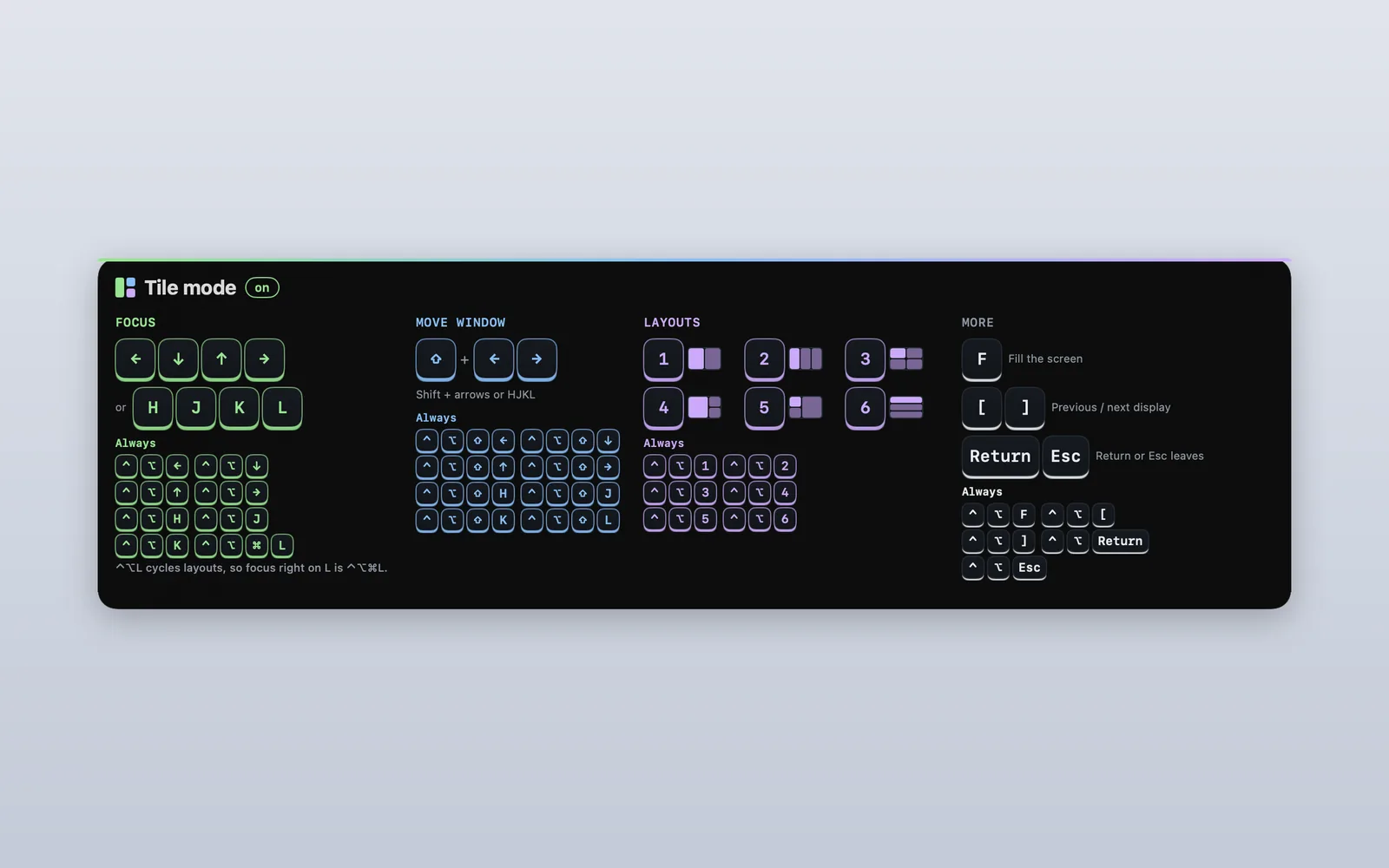
Tilemode needs macOS 14 or later.
Questions
What are the most useful Mac keyboard shortcuts?
Command-C, Command-V and Command-X to copy, paste and cut; Command-Z to undo; Command-Tab to switch apps; Command-Space for Spotlight; Command-Q to quit; and Shift-Command-4 for a screenshot.
What do the ⌘ ⌥ ⌃ ⇧ symbols mean?
⌘ is Command, ⌥ is Option, ⌃ is Control and ⇧ is Shift. Hold them, then press the last key in the shortcut.
How do I print this cheat sheet?
Press Command-P on this page. The site menu and extras are hidden when you print. Choose Save as PDF in the print window to keep a copy.
How do I see the shortcuts for an app?
Open the app’s menus in the menu bar. Each command lists its shortcut on the right. Hold Option with a menu open to see more commands.
How do I change a keyboard shortcut on a Mac?
Open System Settings › Keyboard, click Keyboard Shortcuts and pick a category. Use App Shortcuts to change a menu command’s shortcut in one app or all apps.
What is the Fn key on a Mac?
The key marked fn, or with a globe, at the bottom left of most Mac keyboards. It turns the arrows into Page Up, Page Down, Home and End, and it’s part of the window tiling shortcuts.
What is the screenshot shortcut on a Mac?
Shift-Command-3 for the whole screen, Shift-Command-4 to drag around an area, and Shift-Command-5 for all the screenshot and recording options.
How do I force quit on a Mac?
Press Option-Command-Esc, choose the app and click Force Quit.